

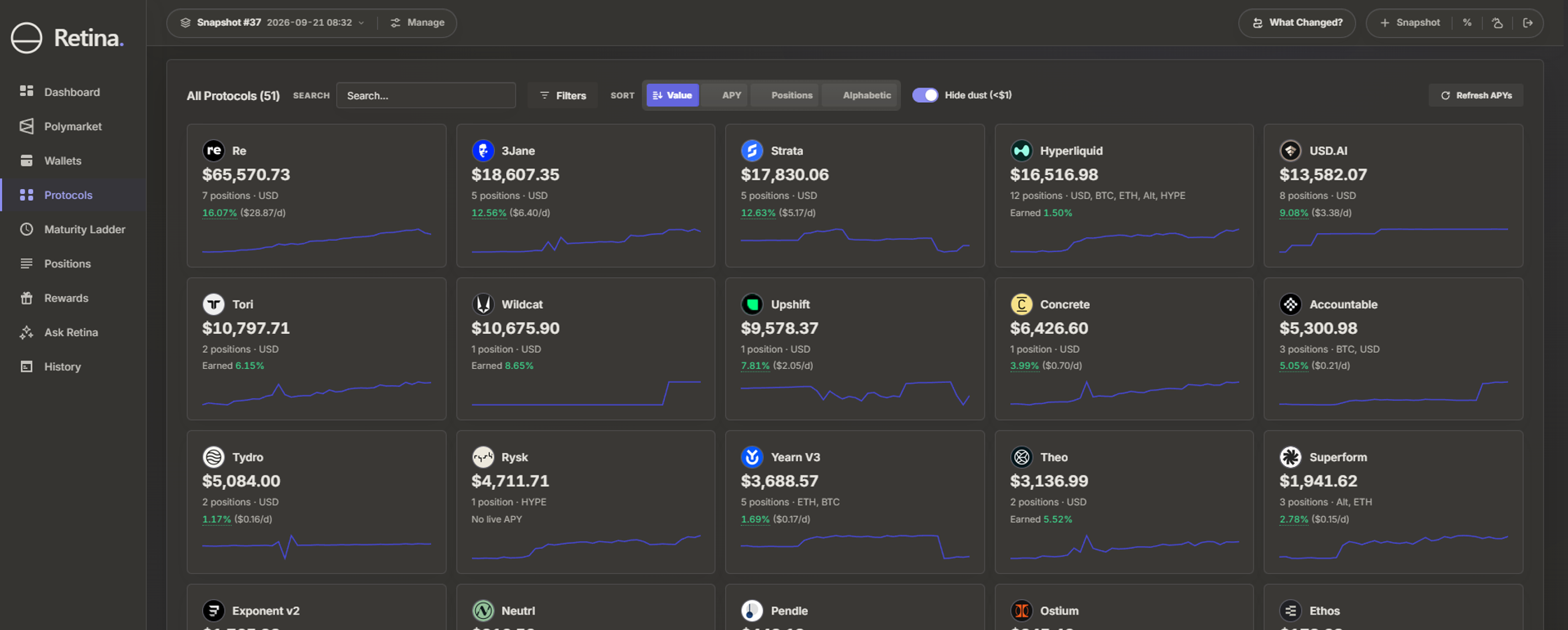
Zapper closed its website, its mobile apps and its API on 3 August 2026, after seven years (The Crypto Times). Zapper only displayed your tokens and positions; it never held them. They are still onchain at the same addresses, and any tracker that reads public addresses can show them again. Setting up a new tracker takes a few minutes. Choosing one takes more thought, because each tracker is built for a different kind of investor.
What should you look for in a Zapper replacement?
Start from what you hold and on which chains. Five questions settle most of the choice:
- Chains. Does it read every chain you use, including Solana and Hyperliquid if you use them?
- DeFi depth. Does it show lending, vaults, LPs and staking as positions, with debt counted against the total?
- History. Does it keep a record of your portfolio over time, or show only today's balances?
- Access. Can you track an address by pasting it, without connecting a wallet?
- Price of history. Today's balances are often free to see. A record over time usually needs a paid plan, so check what that plan costs for the number of addresses you track.
Which tracker is built for what?
Retina is our own product, and it is in the table below. Every other row comes from that tracker's own website, with prices checked on 8 October 2026. Our compare page has the full side-by-side, with a source for every cell.
| Tracker | Chains | Built for | Free option | Paid plans from |
|---|---|---|---|---|
| DeBank | EVM chains, with Hyperliquid and Polymarket positions | EVM DeFi positions and following other wallets | Free to view | $150 a year |
| Zerion | More than 60 networks, including Solana | A wallet to trade from, with tracking | Free app | $99 a year |
| CoinStats | Wallets and exchange accounts | Mixing exchange balances with onchain wallets | 10 portfolios free | $13.99 a month |
| Octav | EVM chains, Solana and Hyperliquid | Funds and treasuries that need reporting | Free tracking | $149 per address a year |
| Jupiter Portfolio | Solana | Solana DeFi in depth | Free | No paid plan |
| Retina | EVM chains, Solana, Hyperliquid and Polymarket, plus gold and silver | One portfolio across chains, with Earned APY, maturity reminders and Ask Retina | Free preview | $99 a year |
DeBank covers EVM chains and shows each wallet's DeFi positions protocol by protocol. Looking up any address is free. A history of your portfolio needs its VIP plan, at $15 a month or $150 a year.
Zerion covers more than 60 networks, Solana among them, and is a wallet as well as a tracker. That suits you if you want to trade from the same app you track in. Its Premium plan costs $99 a year.
CoinStats connects exchange accounts as well as wallets, which makes it the one to pick if much of your money sits on exchanges. Its free plan covers 10 portfolios, and paid plans start at $13.99 a month.
Octav is built for funds and treasuries, and its paid plans are priced per address. Tracking six addresses with daily history on its Lite plan costs $894 a year, $149 for each address (Octav pricing).
Jupiter Portfolio is free and shows Solana DeFi positions in depth. It reads Solana only, so your EVM addresses need a second tracker.
Retina tracks EVM, Solana, Hyperliquid and Polymarket addresses in one portfolio, and you can add gold and silver beside them. For every protocol, Retina shows the APY the protocol quotes beside the rate your positions actually earned over the last 30 days. The Maturity Ladder shows when each position matures, and Retina can remind you by email or Telegram before it does. Ask Retina, a built-in AI assistant, answers questions about the whole portfolio in plain language. Every plan saves snapshots automatically, so you can see what changed between any two dates. Plans start at $99 a year, which is $8.25 a month.
How do I move from Zapper to a new tracker?
- Collect your addresses. Zapper's bundles, the named groups of addresses you saved there, closed with its website, so you can no longer open them. Copy each address from your wallet apps instead. Include cold wallets and any address you only watched on Zapper.
- Paste them into the new tracker. Every tracker above reads public addresses. None of them asks you to sign a message or send a transaction to track an address.
- Check the total. Compare the new tracker's total with the last one you saw on Zapper, if you remember it. Then open the protocols you use most and confirm that their positions appear.
Try Retina
Paste any EVM or Solana address at useretina.xyz for a free preview, without an account. You can join the waitlist on the same page to track all your addresses when Retina opens. To see how Retina measures what a position earned, read What Your DeFi Positions Actually Earned.