

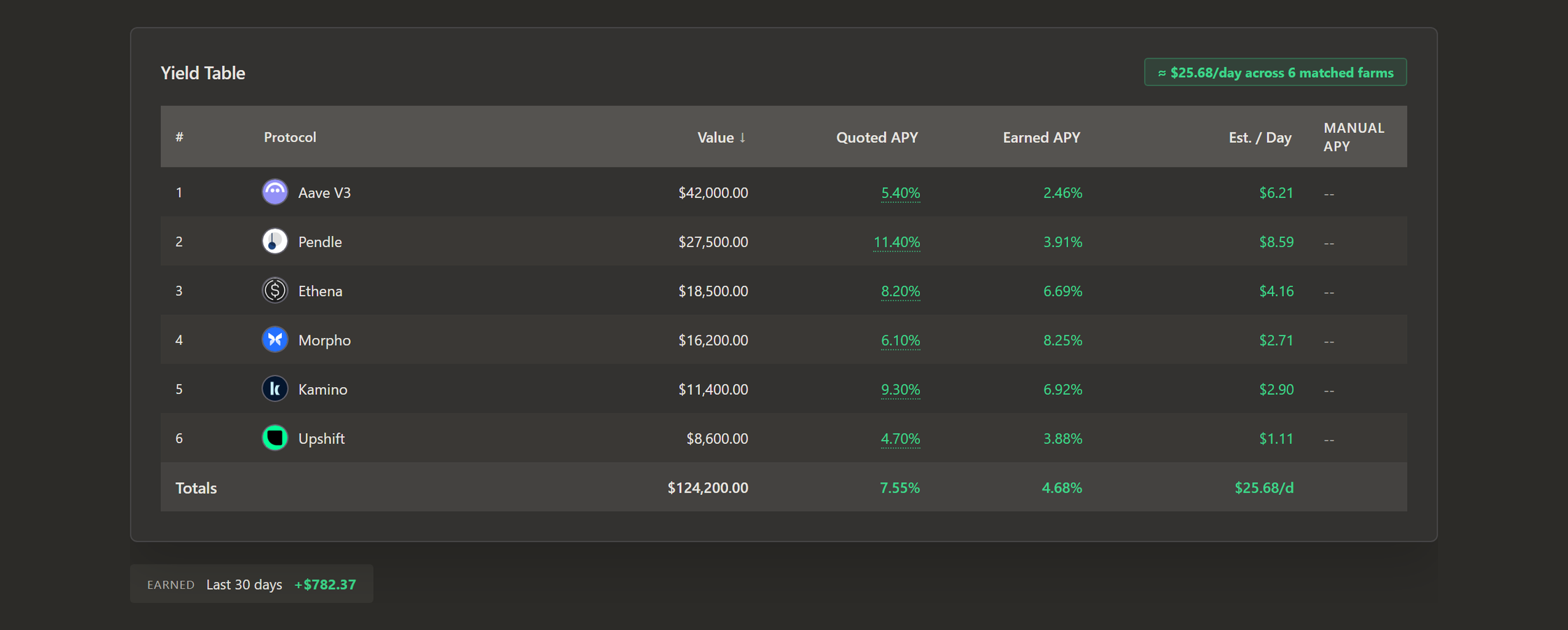
Every DeFi protocol shows you an APY. Aave shows one for each market, Pendle shows one for each pool, and every vault puts one at the top of its page. But what did your positions actually earn last month?
The APY on a protocol's page can't tell you. It is the rate the protocol pays right now, turned into a yearly figure. Your position spent the last month earning whatever the rate was on each of those days, and the rate moved. Incentives started and stopped, and some of the rewards in the quote may still be waiting for you to claim them. What your position made is the sum of all those days, and no protocol page shows it.
That's why Retina shows two numbers for every position you hold:
- Quoted APY: the rate the protocol or pool offers today.
- Earned APY: the yearly rate your positions actually grew at over the last 30 days, measured from your own snapshots.
In the example above, six protocols quote 7.55% together and earned 4.68%. Most of them earned less than they quote today, while Morpho earned more. Neither column is wrong. The quote tells you what a protocol pays now, and the earned rate tells you what your money made.
What is Earned APY?
Earned APY is the yearly rate a position actually grew at over the last 30 days, measured from the snapshots Retina saved of your portfolio. It counts only what the position earned by itself. Money you deposit or withdraw is left out, and so is the price of the asset underneath going up or down.
Because it comes from your snapshots, it also works in the past. Open an older snapshot and Earned APY covers the 30 days before it, so you can see what any month earned.
Why the earned rate differs from the quoted one
Most of the gap comes from the quote describing a single day while your position lived through a whole month. These are the usual reasons:
- The rate changed. Lending rates follow demand for loans, and pool rates follow trading, so the rate your position earned two weeks ago may be far from today's.
- Rewards you haven't claimed. Many quoted APYs include reward tokens. Until you claim them and add them to the position, they don't grow it.
- Fees. Some vaults quote a rate before their performance fee. What reaches you is the rate after it.
- Pendle LPs and PTs move with their market. When a market's implied rate changes, its LP and PT change value with it, so a month can land well above or below the quote.
How Retina measures it
To measure what a position earned, Retina first needs to know how it earns. DeFi positions earn in one of two ways, and Retina follows each one differently.
Some positions earn more tokens. A deposit on a lending market such as Aave or Morpho receives a few more tokens every day. Retina measures how fast that balance grows. A deposit or withdrawal shows up as a jump that no yield could make, so Retina splits the history there and counts only the growth in between.
Others earn by each token becoming worth more. Vault shares and Pendle PTs keep the same balance while each token becomes worth more of the asset it holds. Retina measures that worth in the asset underneath, so an ETH vault is measured in ETH and ETH's own price moving doesn't change its rate.
Either way, the rate is a line fitted through every snapshot in the 30 days. One badly priced day moves that line a little and never decides it.
Real returns count in full, including a token that is repriced upward when its protocol earns or buys back supply. Those gains arrive as small steps, day after day. A jump of more than 1% in a single day is a different thing. That is about a month of a 12% yield arriving at once. In early September, the price of a 3Jane pool on Pendle jumped 2.2% in a day. The pool's implied rate hadn't moved, and the token underneath had grown 0.03% that day. Nothing in the market explains a jump like that, so Retina leaves such a day out of the rate, whichever way it went. Your portfolio value and History still show it.
When a new position gets its rate
A position gets its first Earned APY once it appears in two snapshots taken at least a day apart. Save a snapshot today and your positions have a rate tomorrow.
Those first rates rest on only a few days, so they move around until more snapshots arrive. After a week, Retina shows a dash instead of a rate if the snapshots disagree by more than 5 percentage points, because at that point they don't describe a steady rate. A negative rate is shown as measured. If a position lost value over the month, you should know about it.
A token you hold in several wallets earns one rate across all of them. A position you opened last week therefore shows the rate that token has earned across your portfolio, while its earnings in dollars count only the days you held it.
Some positions are never measured:
- altcoins, which have no asset underneath to measure against;
- Pendle YTs, which lose value by design as they approach maturity while their yield is paid out separately;
- unclaimed rewards, perps, options, shorts and manual positions.
One rate per protocol, and one for your portfolio
A protocol's Earned APY in the Yield Table is the average of its positions' rates, weighted by what each one is worth. It appears once positions holding at least half of what you have in that protocol have a rate.
The Totals row does the same for your whole portfolio: it averages the rate of every dollar that has one. A rate Retina doesn't know is left out, and a rate that really is 0% counts. Hover a total to see how much of your money it covers.
What your borrowing costs
A loan is measured the same way. On a protocol's page it appears as Borrow cost, so if you run a loop, you see what the position earns and what the borrowing costs side by side.
Where you'll find it
- The Yield Table on the Dashboard, with Earned APY beside Quoted APY for every protocol.
- Each protocol's page, with its Earned APY, its Borrow cost and the rate of every position in it.
- The Protocols page, where a card shows Earned APY when the protocol quotes no rate at all.
- The Earned tile under your portfolio total, with what the last 30 days made in dollars after borrowing costs.
- Ask Retina, which answers "what did my farms actually earn?" with both rates for each protocol.
The Earnings calendar on the History page turns the same measurement into a record of every day. For the full method, see Earned APY in the docs, and Your Portfolio Needs New Tools explains why we built Retina.
Try it on your own portfolio
Retina tracks DeFi across EVM chains, Solana, Hyperliquid and Polymarket in one portfolio. Paste any EVM or Solana address at useretina.xyz to preview it without an account. Sign in and save your first snapshot, and tomorrow your positions have their first Earned APY.