
How much did your portfolio earn yesterday? If your money sits in ten protocols on five chains, the answer is spread across ten dashboards, and none of them keeps a daily record for you.
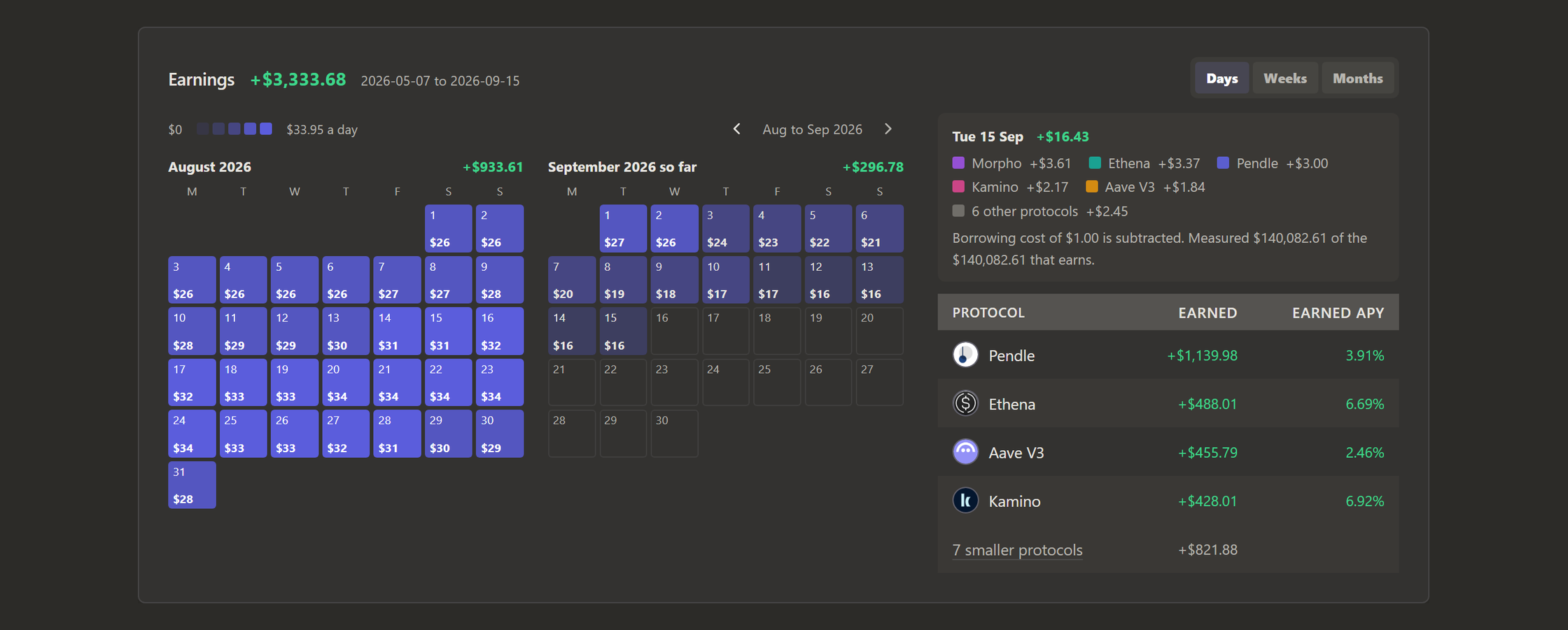
Retina keeps one. The Earnings card on the History page shows what your portfolio earned on every day, after borrowing costs, measured from your own snapshots.
Each day is a square in a month calendar. The more a day earned, the darker its square, and a day that cost more than it earned turns red. A whole month fits in one look.
What a day shows
Click a square, or hover over it on a computer, and the panel beside the calendar breaks that day down:
- what each protocol earned, with the five that earned the most over the range named and the rest grouped together;
- what your borrowing cost that day, already taken off the total;
- how much of your earning money Retina could measure that day.
The total for the whole range sits at the top of the card, and the range buttons at the top of History choose the range. Under the calendar, every protocol's earnings for the range are listed with its Earned APY. Click a protocol to open its page, where the same card shows only that protocol's positions.
How Retina counts a day
Your balance changes every day for reasons that have nothing to do with income: deposits, withdrawals and price moves. That's why Retina counts each day from measured rates. Every position earns that day's value at its Earned APY, the rate Retina measured for it over the 30 days before.
Data is sometimes missing, and a few rules keep the days honest when it is:
- A gap in measuring leaves your income alone. If a position can't be measured for a while, it keeps its last measured rate for up to 30 days. Without this rule, a week in which one protocol couldn't be measured would look like your income had collapsed.
- A new position's first days count. Retina counts them at the first rate it measures for the position, which takes two snapshots a day apart. Once the position has a week of history, those first days use the rate it settled at, so an unsteady start doesn't show as a loss.
- A day without a snapshot borrows the one before it, for up to a week, and says which day it used when you select it.
A deposit makes the days after it larger, because more money is earning. The deposit itself never counts as earnings.
Weeks and months
Days is the calendar. Weeks and Months show the same earnings as bars, split into the five protocols that earned the most over the range, with the rest in one colour. The calendar shows as many recent months as fit on your screen, and the arrows take you further back.
The same number everywhere
The Earned tile under your portfolio total is the last 30 days of this same count, so the Dashboard and History always agree. Click the tile and it opens the calendar.
Ask Retina reads the same count too. Ask what you earned last week, which day earned the most, or what one protocol made last month, and the answer matches the calendar to the cent.
Why the days look steady
Because each rate is measured over 30 days, a steady position earns about the same every day, and a reward paid out once a week is spread over the days that earned it. The calendar changes when your money moves or a rate changes, and that is what makes it a readable record of your income.
The card appears once a position has two snapshots taken at least a day apart. The docs cover the details under Earnings.
Try it
Retina tracks DeFi across EVM chains, Solana, Hyperliquid and Polymarket in one portfolio. Paste any EVM or Solana address at useretina.xyz to preview it without an account. Retina opens to everyone soon, and the waitlist emails you when it does. Once you have two snapshots a day apart, your calendar has its first day.